If you have purchased the SimulConn Master board, you have it in one of these configurations:
- SC-SIMVIMX-MASTER-R1 (raw PCB, no components. Add and solder DIP components yourself)
- SC-SIMVIMX-MASTER-R2 (pre-soldered SMD components. No Arduino! Add and solder connectors and Arduino yourself)
- SC-SIMVIMX-MASTER-R3 (pre-soldered SMD components with embedded Arduino and all connectors
SC-SIMVIMX-MASTER-R2
 This version has pre-soldered SMD components. But no Arduino. You will have to acquire an Arduino MEGA 2560 Pro and solder it on yourself.
What you need is:
- MEGA2560PRO : Connects the Arduino.
Optional, solder a female socket header on the PCB for easy mount/dismount of the Arduino. - J1-J6 : Connects cable to Extension boards.
Use 20-pin IDC cable sockets. - X1 : 12v input power connecter.
Use a 2-pin screw terminal block connector. - Stepper/Matrix : Serial connection.
This connecter holds the serial connection for stepper motor and keyboard matrix. - Servo : Serial connection.
This connecter holds the serial connection for Servo motor. - LCD : Serial connection.
This connecter holds the serial connection for LCD display.
It is also recommended to mount the Arduino in a female socket header, for easy replacement.
The following components are recommended/required for the Master board.
| Placement | Component | ||
|---|---|---|---|
 | J1-J8 | IDC cable socket 20p | Recommended |
 | Optional | 2.54mm double row female socket header | Recommended |
 | X1 | 2 Pin Screw Terminal Block Connector 5.08mm | Recommended |
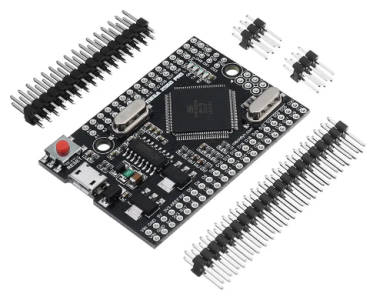 | MEGA2560PRO | RobotDyn Mega 2560 PRO CH340G ATmega2560-16AU | Required |
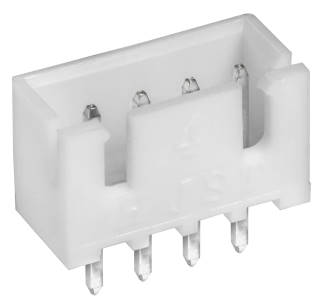 | J9-J11 | JST XH 2.54mm 4Pin Socket | Recommended |
.
SC-SIMVIMX-MASTER-R3
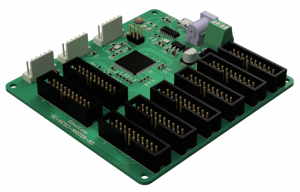
The rev3 of the MASTER board has an embedded Arduino and all components pre-soldered.
For troubleshooting the MASTER boards connection with the IO boards, use the SCtest application HERE.
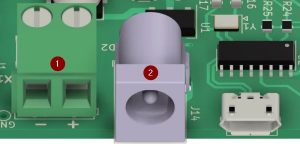
You can power the MASTER board with 12v in one of two ways:
- Screw terminal
- DC power jack
To connect the serial interfaces to the MASTER board:
